Habit & Goal Management System with 12 Week Year Method
Build Momentum Logo Build Momentum
Where Intention Becomes Execution

Your goals, habits, projects, notes, and tasks — finally in one place. Finally connected.

Does this sound like you? You have the goals. You have the intention. But somewhere between the plan and the doing, something always gets in the way — and lately, that something is the system itself. Build Momentum removes the friction, so the only thing left between you and your goals is you.

Get Started for Free

✓ Free to start  ·  ✓ No credit card required  ·  ✓ Disable modules you don't need
See How It Works ↓

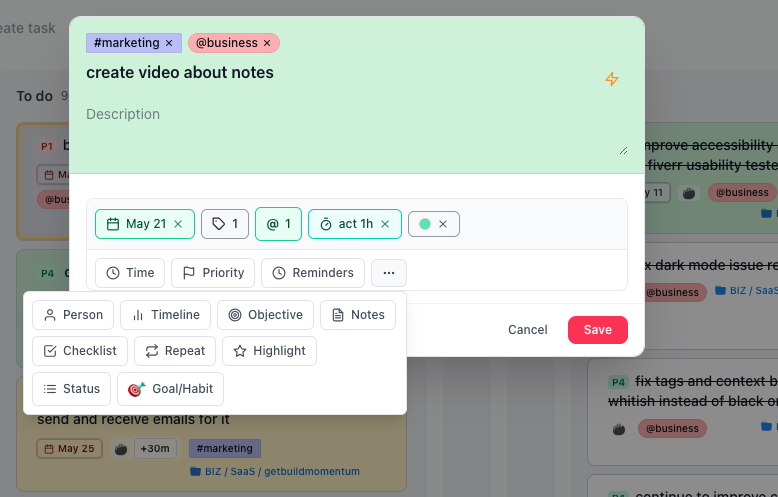
Build Momentum daily dashboard Build Momentum task creation on kanban board
Module 1

Goal & Habit Tracking
With Progressive Stakes — Daily to Quarterly

Beeminder's accountability without the financial stress. Habitica's gamification without the busywork. Track with min/target/stretch goals and real consequences you control.

Not All-or-Nothing. Finally.

Most habit & goal tracking apps are built on the premise that you either do it perfectly or you fail. Build Momentum gives you three levels of success so you can move forward even on hard days.
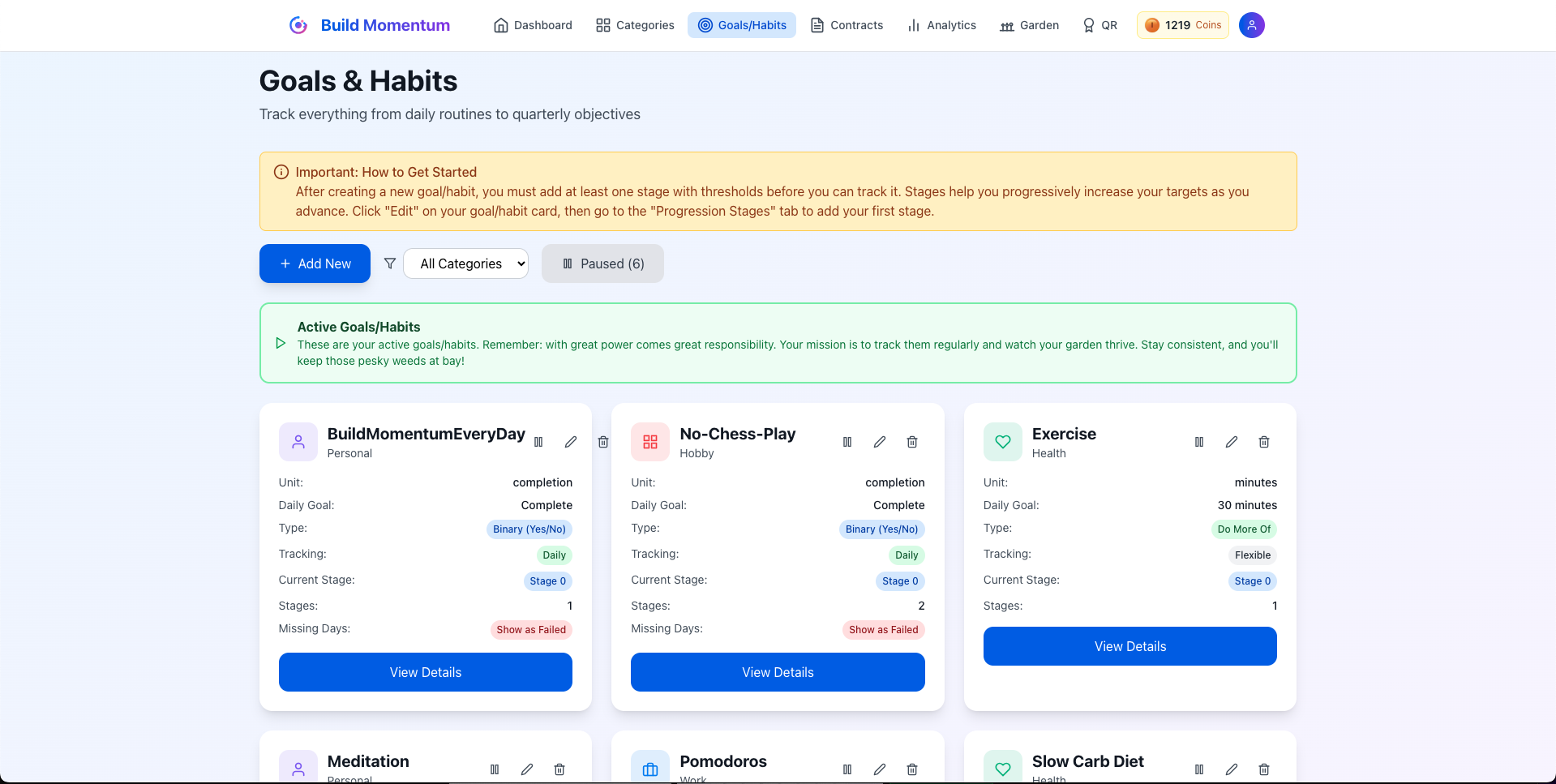
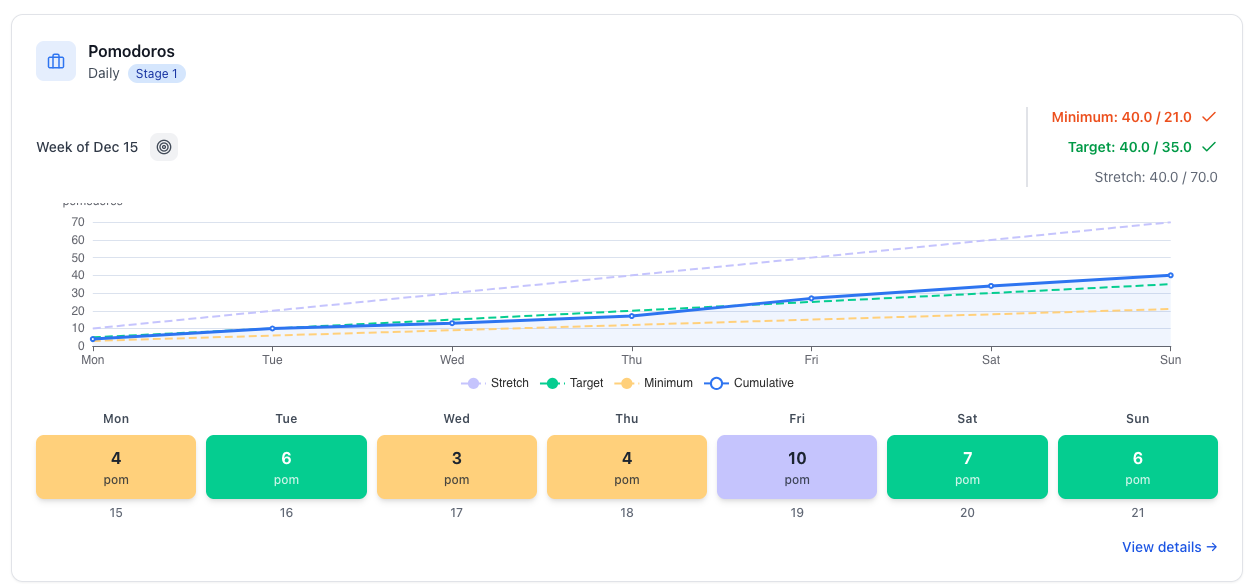
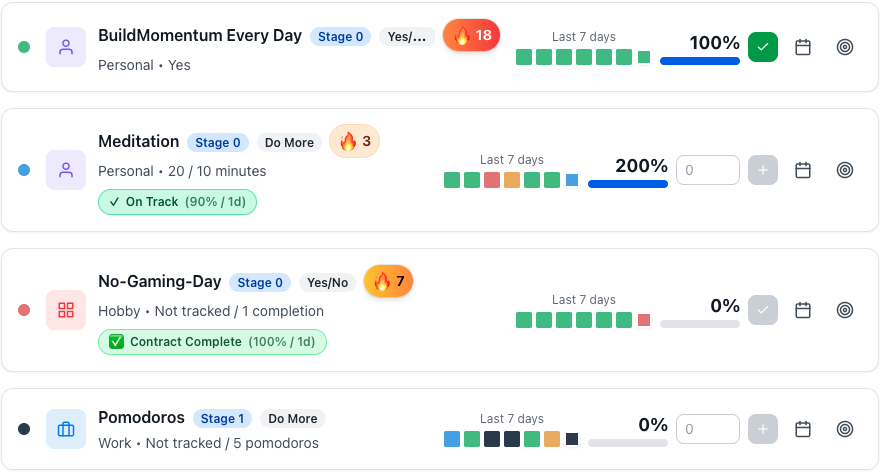
  • Minimum: Your bare minimum — you don't need to feel bad when you have an off-day
  • Target: Your actual goal — this is what you are aiming for
  • Stretch: Crushing it — nice, you are fully in the flow
  • If this is too complicated we also have a simple version for you where you only set one goal
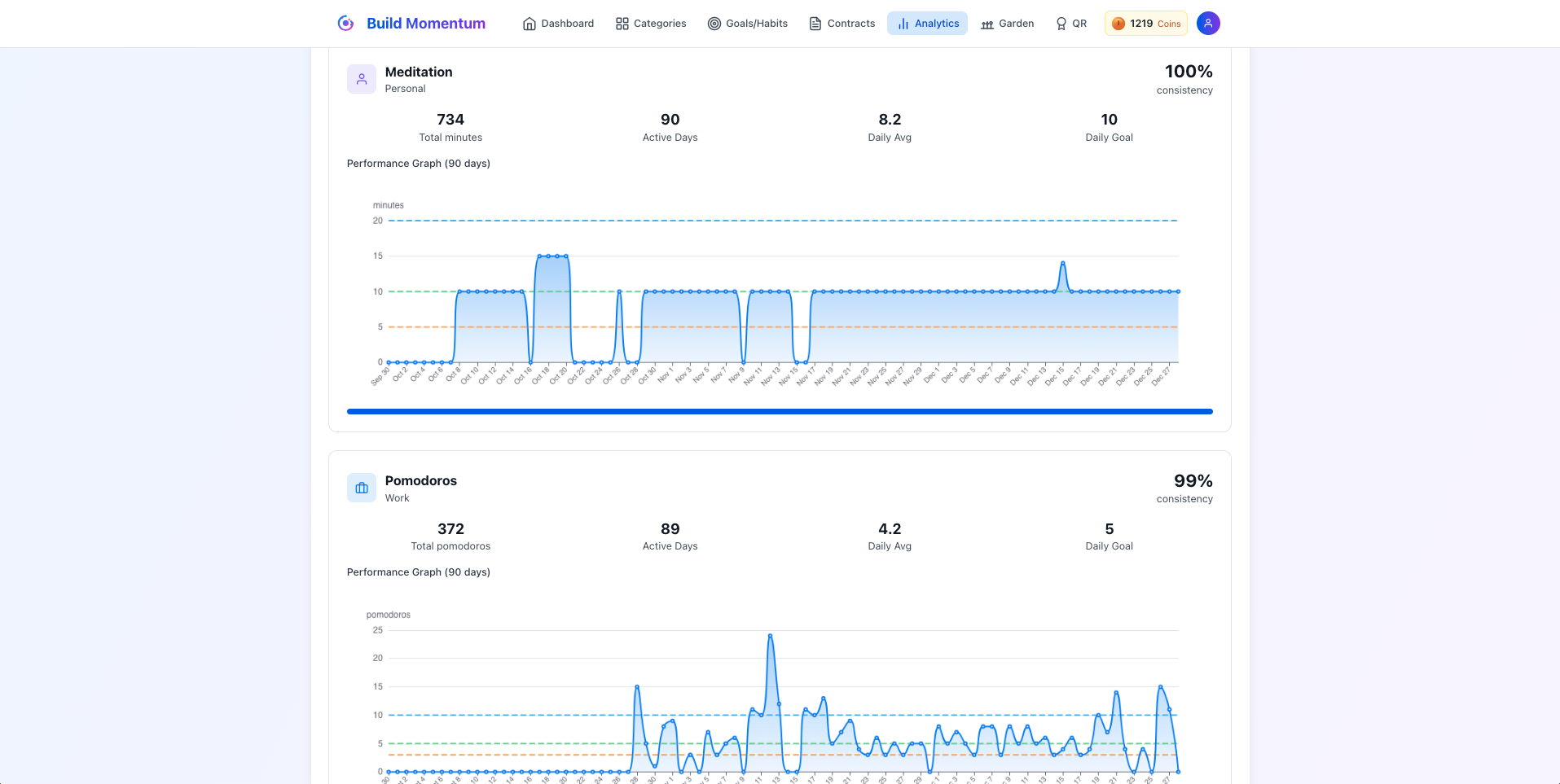
  • Clean Analytics for all your goals and habits: daily, weekly, monthly, quarterly (12 Week Year)
  • 3 goal & habit types: do more, do less, binary
  • Pause goals & habits when life happens — no punishment for real life
  • Track progress with visual charts and streaks
  • Set reminders and notifications to stay on track
  • ADHD-friendly: color-coded goals, quick entry, clean layout
  • Over 25+ different color palettes and dark mode to make the app truly yours

Built on the frameworks that actually work.

Atomic Habits 12 Week Year OKR Framework Kaizen Compound Effect Don't Break the Chain
Build Momentum goals and habits Build Momentum weekly views Build Momentum analytics graph view

Not Just Another Habit App

❌ Beeminder

  • $5–$810+ charges when you fail
  • Financial anxiety and stress
  • Can't pause habits easily
  • Only 2 habit types
  • All-or-nothing pass/fail
  • Interface from 2005
  • No rewards, only punishment

⚠️ Other Habit Apps

  • One-dimensional (did it or didn't)
  • No real consequences
  • Easy to ignore and quit
  • Streaks mean nothing
  • No actual accountability
  • Works for a week, then forgotten

✅ Build Momentum

  • Real consequences — $0 lost
  • 3 habit types (more/less/binary)
  • 4 timeframes (daily → quarterly)
  • 3 goal levels: min/target/stretch
  • Choose your stakes (weeds optional)
  • Pause when life happens
  • Simple — start in 5 minutes
Module 2

GTD-Powered Task Management

Build Momentum brings Kanban, list view, and time block scheduling into one fluid system — with drag-and-drop planning and views that adapt to how you think. Built on Getting Things Done, designed for the way you actually work.

From Inbox Chaos to Clear Execution

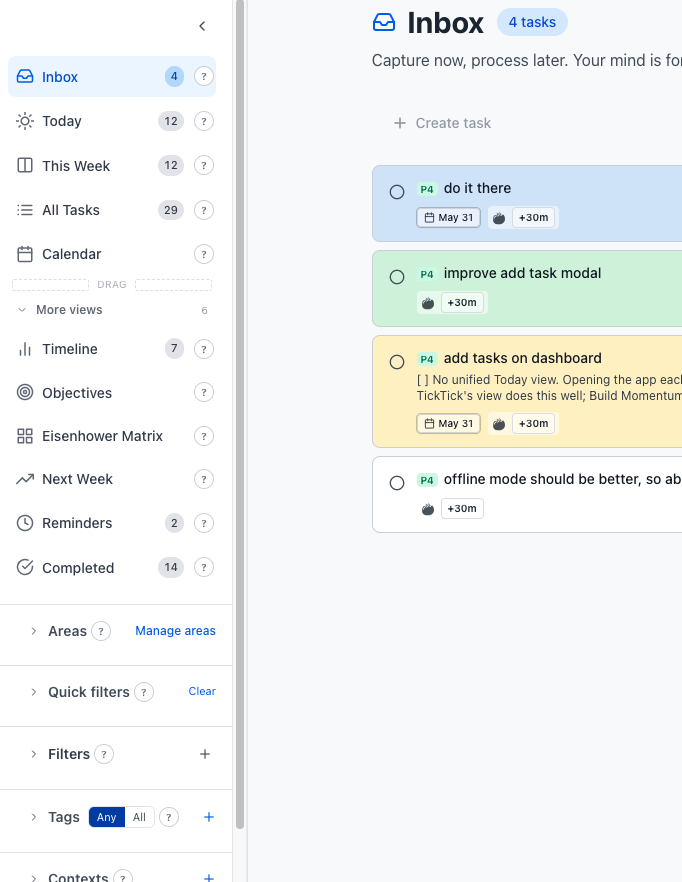
Everything lands in the inbox first. The system keeps you focused without letting anything fall through the cracks.
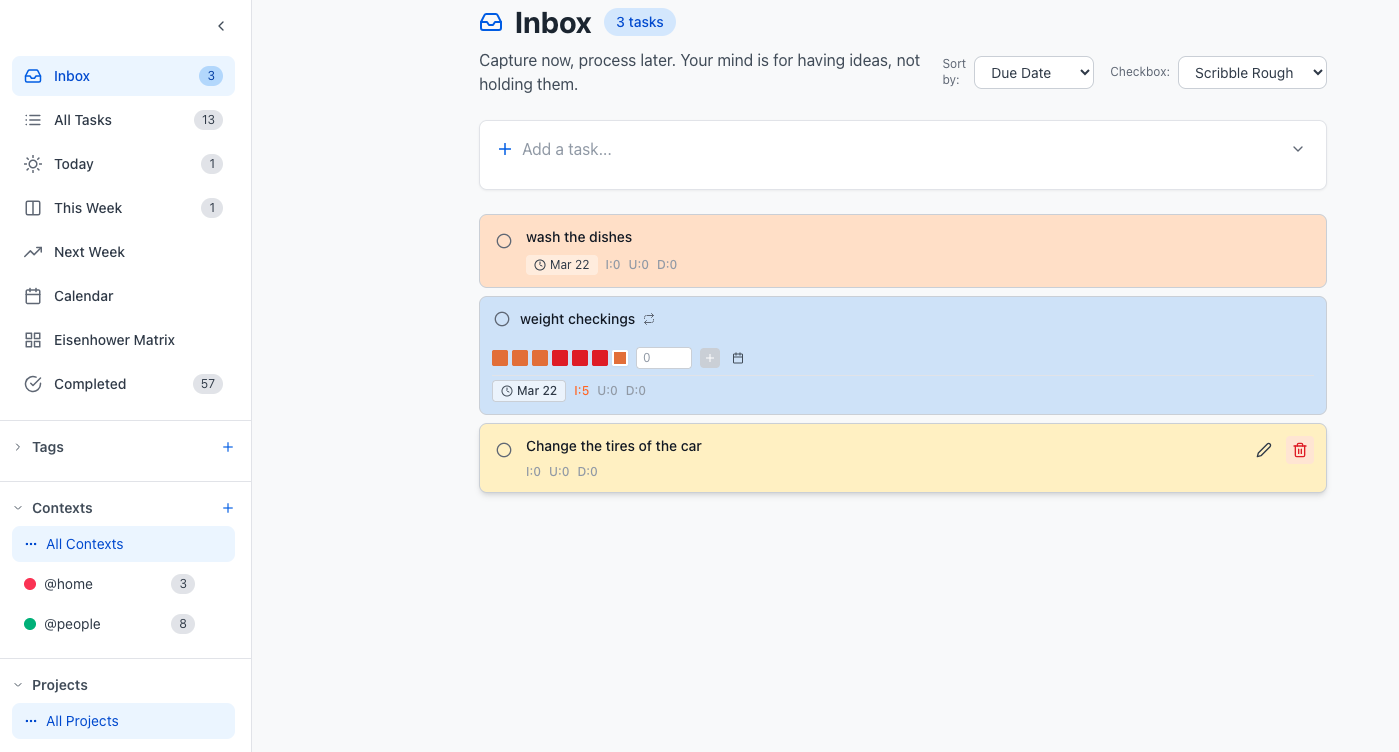
  • GTD flow: Inbox → Today → This Week → Next Week → Calendar
  • Eisenhower Matrix for urgent/important prioritization
  • Switch between Kanban, List, or Time Blocks view — anytime
  • Two task types: Classic tasks or Goal/Habit tracking
  • Quick Add Tasks for capturing ideas without breaking your flow
  • Drag & drop tasks across days to reschedule instantly
  • Subtasks to break complex work into manageable steps
  • Highlight tasks — a bigger checkbox and bolder border make them impossible to miss
  • Recurring tasks for routines and repeating work
Inbox Today This Week Next Week Calendar Kanban Drag & Drop Subtasks Recurring
Build Momentum tasks GTD system

Quick Add Tasks — Set Everything Without Touching the Mouse

Same idea as Todoist or TickTick, with more depth: type your task title and drop ! tokens inline to set every detail in one shot.

Buy milk !due:15.4. !st9:00 !ee:25 !pr:Home !i4 !hl
  • !due:15.4.2026 — due date
  • !st9:00 !et10:00 — start and end time
  • !sd:1.1. !ed:2.1.26 — multi-day span (timeline)
  • !ee:25 !ae:20 — estimated & actual effort (minutes)
  • !pr:Work — assign to a project
  • @phone #errand — context and tag
  • !i4 !u2 !d1 !p2 — importance, urgency, difficulty, priority
  • !c:pink or !c#D6E5FA — color by name or hex
  • !hl — highlight (pins to top of dashboard)

One line. Zero clicks. Everything set.

Build Momentum GTD inbox and task prioritization

Prioritize With Precision

Not all tasks are created equal. Set the right attributes so the most critical work always surfaces first — and never gets buried under busy work.

  • Prioritize by importance, difficulty, and urgency
  • Due dates with visual overdue indicators
  • Task colors for quick visual scanning
  • Contexts and tags (e.g., @home, @computer, #thedog)
  • Custom checkboxes to match your personal style
Importance Difficulty Urgency Due Dates Tags Contexts Task Colors

How Build Momentum Compares to Productivity Apps

❌ TickTick

  • Tasks only — shallow binary habit tracking
  • No project management with KPIs
  • No extensive notes system
  • No gamification or accountability system
  • Separate tools needed for full workflow

❌ Todoist

  • Tasks only — no goals or habits
  • No Eisenhower matrix or advanced project management
  • No notes or project modules
  • Karma points feel arbitrary
  • No full Day-to-Day workflow

❌ Notion

  • Notes-first — tasks and projects feel like an afterthought
  • No built-in habit tracking or goals
  • Requires manual database setup
  • Heavily manual — every workflow needs to be built from scratch.
  • No gamification or accountability

✅ Build Momentum

  • Tasks + Goals + Habits in one system
  • GTD inbox, Eisenhower matrix, kanban
  • Projects with milestones and KPIs
  • Notes and projects included
  • Real gamification with garden & coins
  • One login, one workflow, one source of truth
Module 3

Accountability Contracts with Legendary Mentors

Some goals matter too much to leave unguarded. So cage them in. Create a contract. Stake your Integrity Coins. Pick a legendary mentor to stand watch. When the stakes are real, your brain treats the commitment differently—and suddenly, quitting has a cost you're not willing to pay.

Put Real Stakes Behind Your Goals

Loss aversion is one of the most powerful psychological motivators. When you stake your Integrity Coins, your brain treats the commitment seriously.
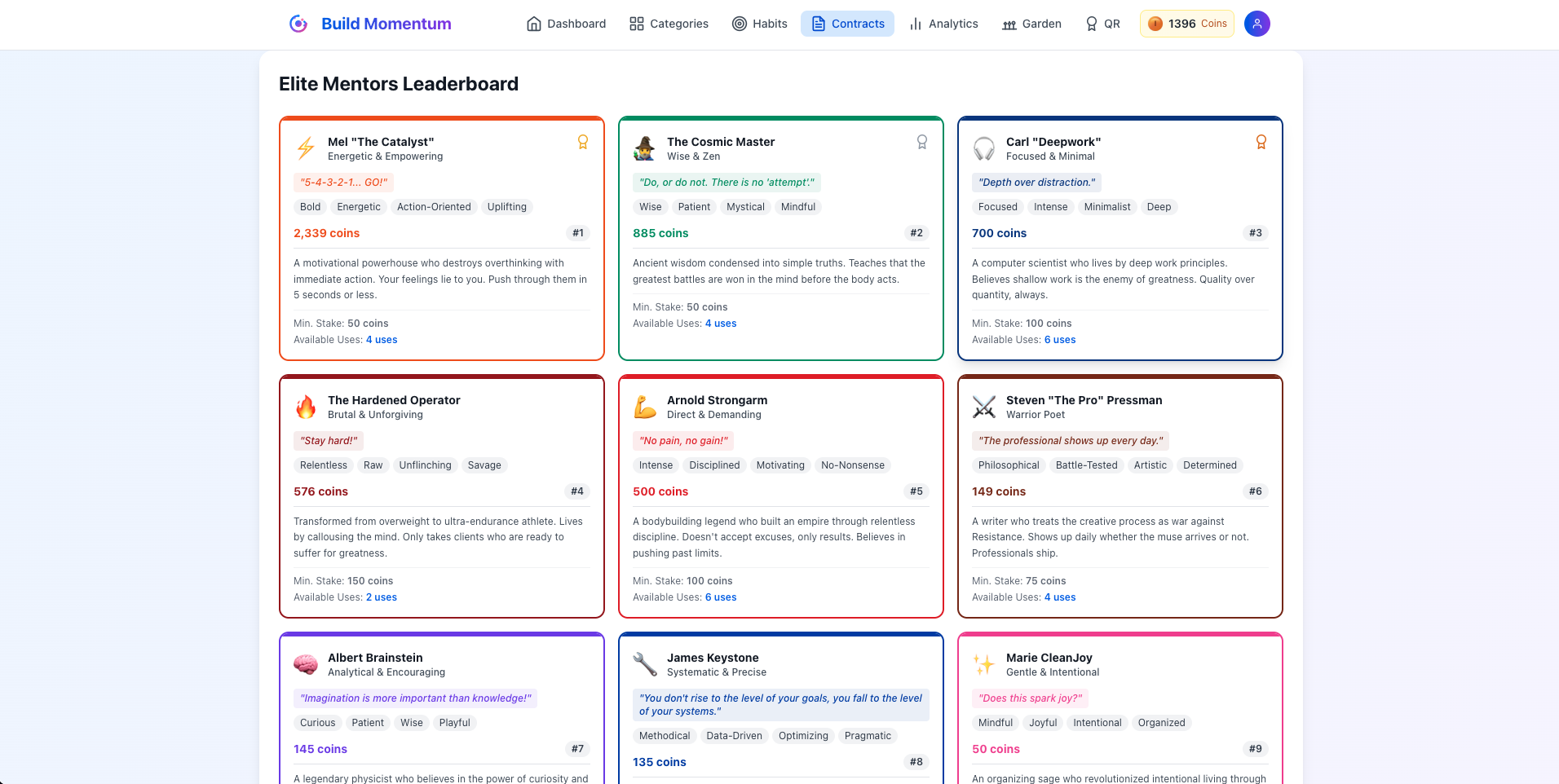
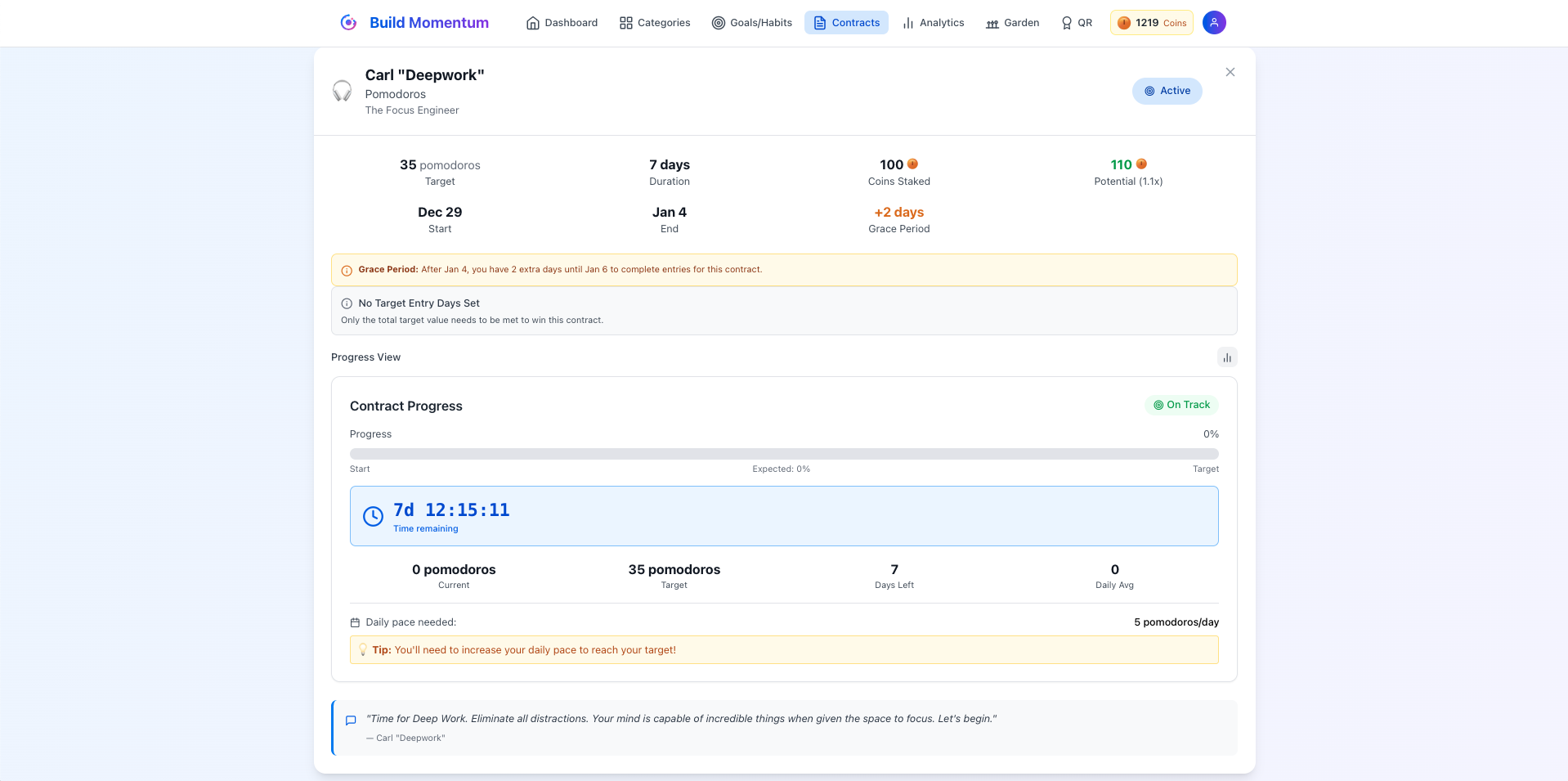
  • Create contracts with 20+ legendary mentor personalities
  • Choose from unique archetypes — from relentless drill sergeants to philosophical guides and more
  • Get motivating or tough-love messages throughout the contract
  • Reminders when you're close to breaking — before it's too late
  • Lose your staked Integrity Coins if you break the contract
  • Free plan includes 1 contract to try; Pro unlocks 7; Ultimate unlocks unlimited
20+ Mentors Coin Stakes Tough Love Messages Loss Aversion
Build Momentum integrity contracts Build Momentum contract
Module 4

Projects with Milestones, Goals & Notes

Turn big goals into structured, trackable projects. Set priorities, goals, milestones, and KPIs so every project moves forward — seamlessly.

Run Projects Without Losing the Thread

Each project gets its own space with everything it needs: description, area, goals, milestones, KPIs, and embedded notes. Work through your active projects by priority and keep inactive ones archived but accessible.
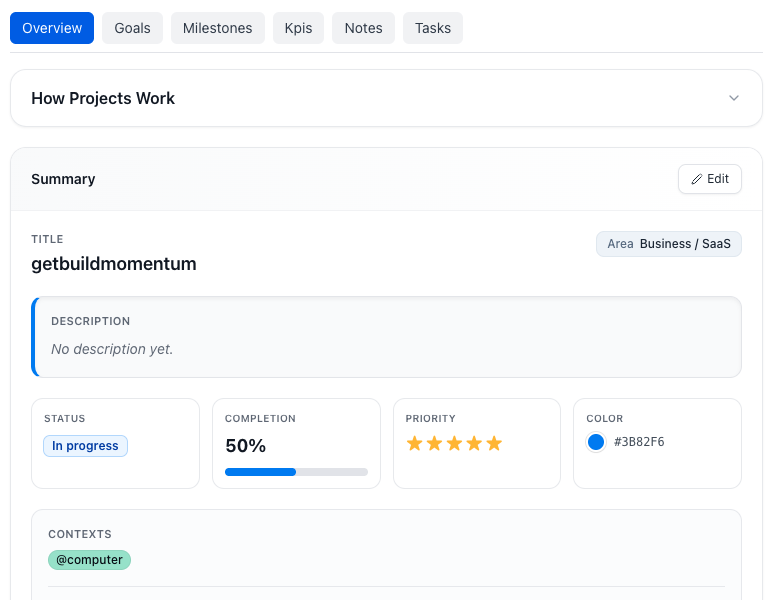
  • Organise projects by area — Business, Personal, Health, and more
  • Rate each project 0–5 stars to know exactly what to focus on next
  • Set milestones to mark meaningful progress checkpoints
  • Track KPIs directly within the project
  • Project-specific notes and tasks embedded inside each project
  • Set deadlines and track time-to-completion
Build Momentum project management
Module 5

Everything You Know, Where You Need It

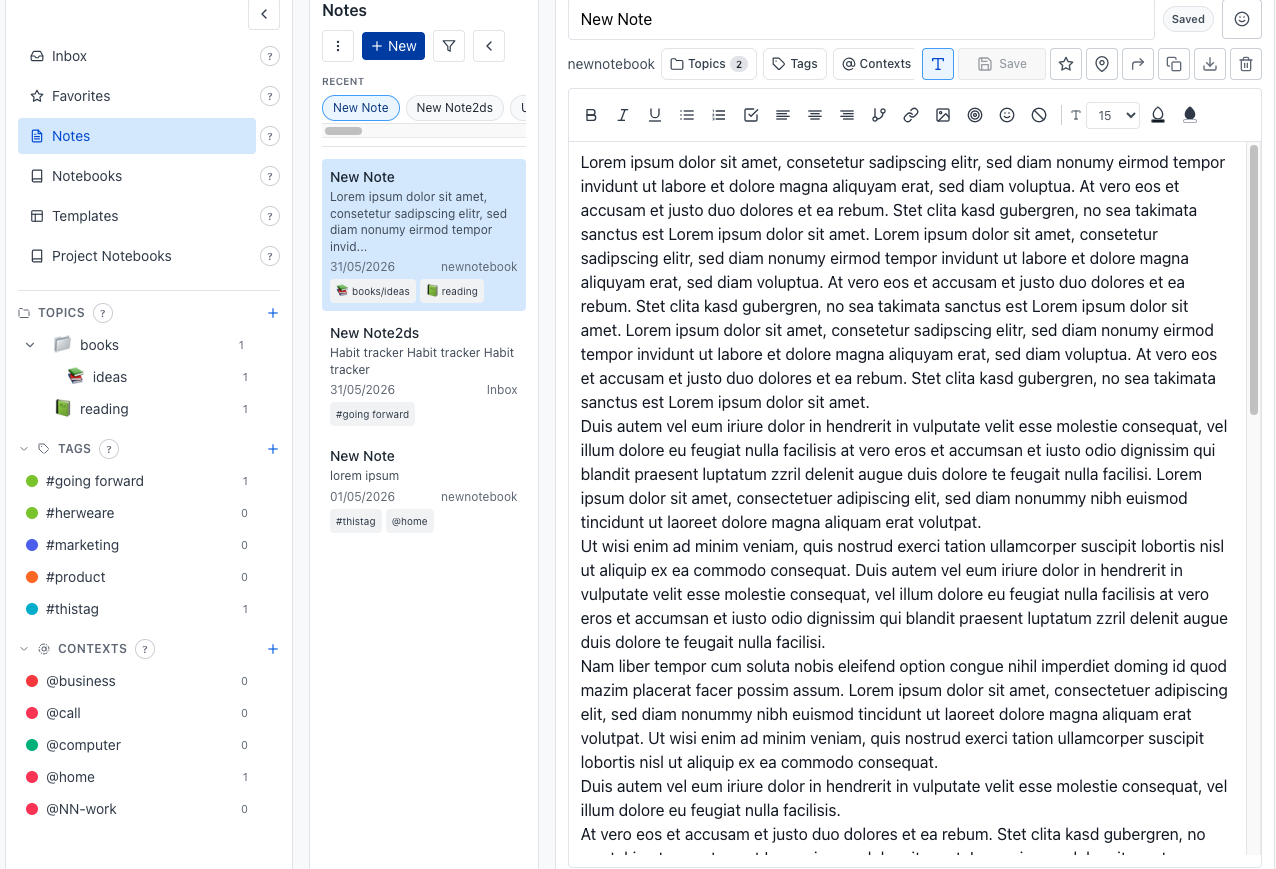
Stop scattering knowledge across Notion, Apple Notes, and random docs. Keep all your thinking inside the same system you use to execute.
Build Momentum notes section

Notes That Stay in Your Workflow

Notes in Build Momentum aren't an afterthought — they're woven into your projects, your daily planning, and your long-term thinking. Everything is one click away, without opening another app.

  • Organise by notebooks or topics — whatever matches how your brain works
  • Rich formatting, templates, and reusable note formats for recurring work
  • Connect notes to other notes and tasks — build a web of linked knowledge
  • Pin favorites for quick access to notes you return to often
  • Project-specific notes embedded directly in each project
  • Export notes as PDF when you need to share or archive
  • Always within reach — no app switching required
Notebooks Topics Linked Notes Templates PDF Export Favorites Project Notes
Module 6

Budget Tracker With Necessity Levels

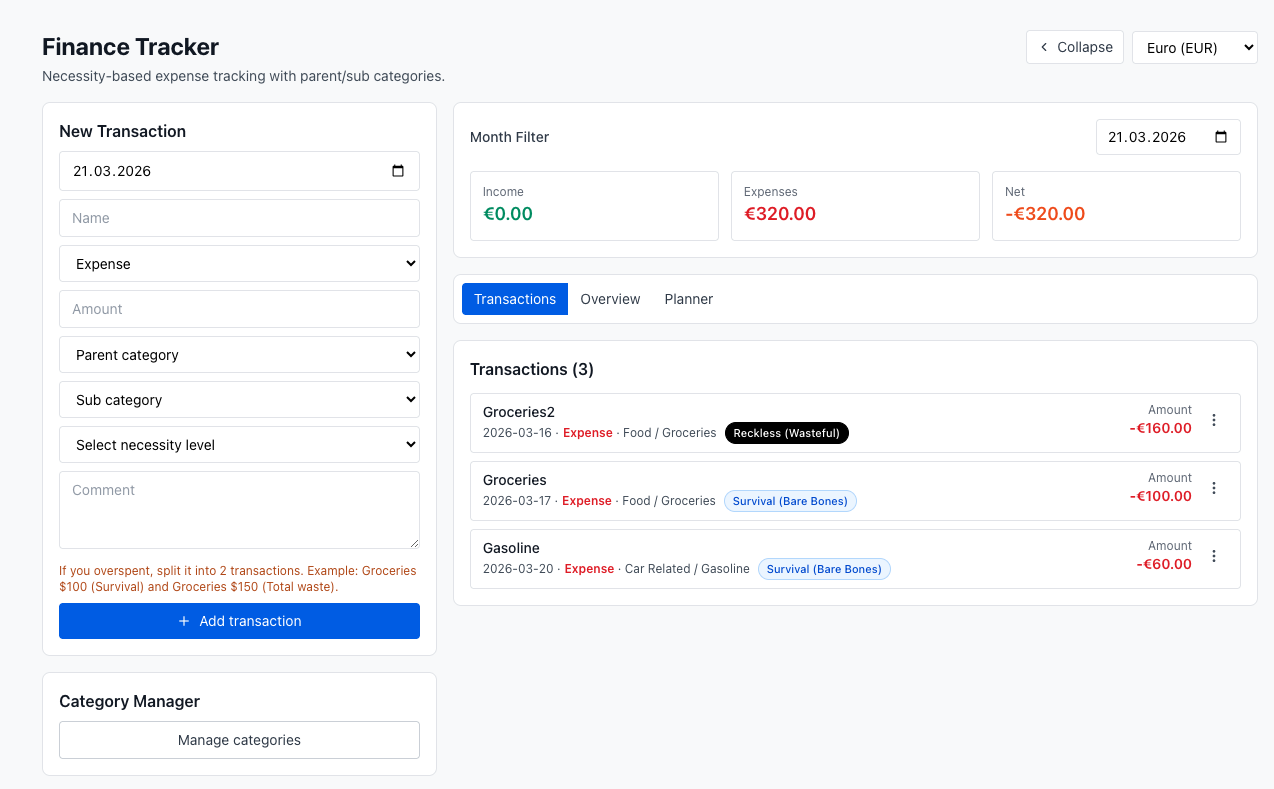
Track every expense with brutal honesty. Not just categories — a 1–5 necessity score on every line so you see need vs. impulse, not just where the money went.
Build Momentum budget tracker

Know Exactly Where Your Money Goes

Build Momentum pairs categories with a necessity level on every expense — so weekly and monthly views show patterns your old spreadsheet never surfaced.

  • Track expenses by week and month
  • Category-based structure with clear summaries
  • Rate each purchase 1 (survival) through 5 (reckless) in one tap
  • Necessity next to every line — so treats and dumb tax show up in the data
Categories Weekly & monthly Necessity 1–5 Honest patterns
Module 7

Stay Close to the People Who Matter

Stop relying on vague memory for your most important relationships. One place to track who someone is, how things are going, and what you don't want to forget.
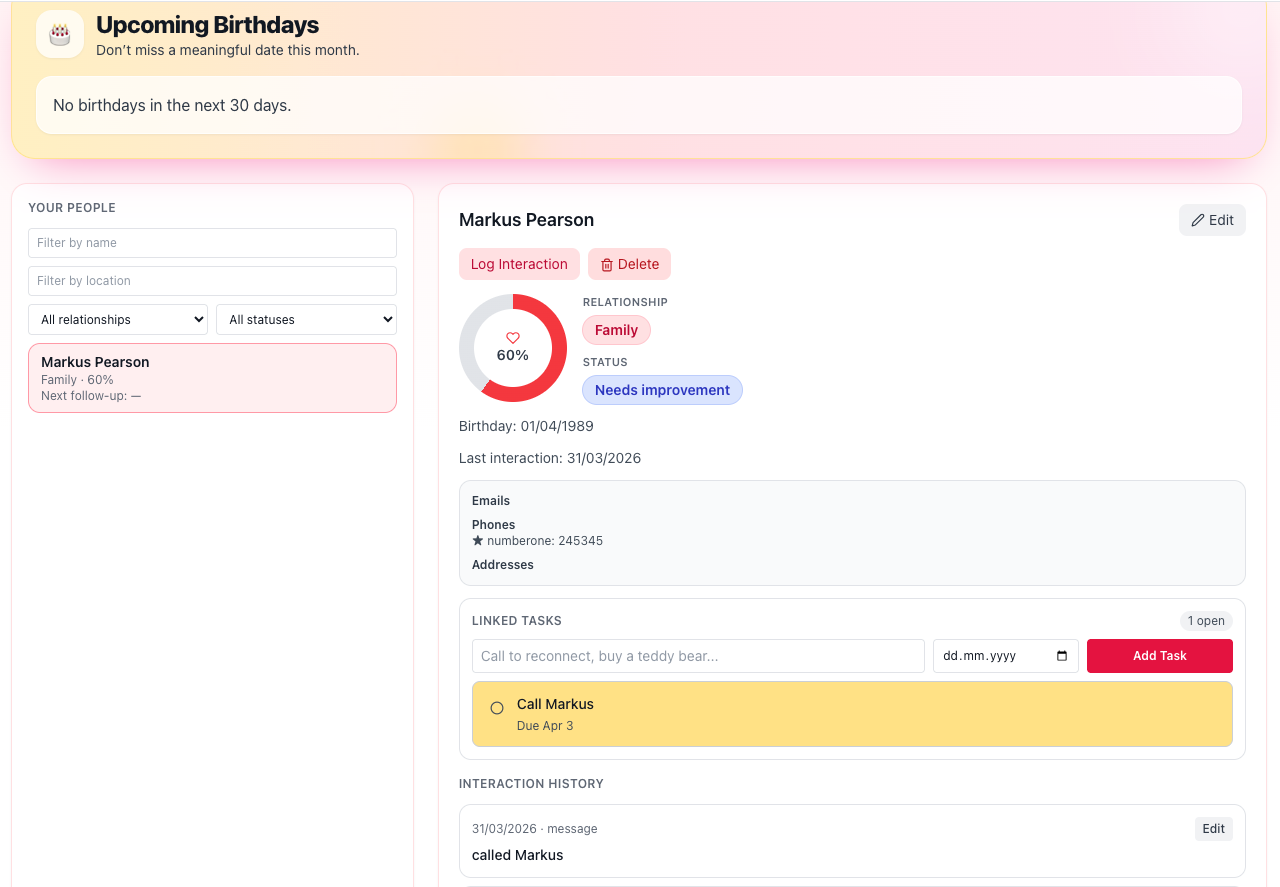
Build Momentum people module

👥 Your Personal Relationship Hub

Relationships fade when life gets busy. Build Momentum gives you a dedicated space to track the people who matter — so you show up for them intentionally, not only when you happen to remember.

  • Keep contact details in one place — email, phone, location, and more
  • Never miss a birthday with upcoming birthday reminders
  • See how each relationship feels — strong, fine, needs work, or check in soon
  • Log catch-ups (messages, calls, visits) with optional follow-up reminders
  • Link tasks directly to a person — "call Mom," "send thank-you"
  • Filter by name, location, or relationship type to focus on who matters now
  • Start simple — add someone with basics and fill in the rest over time
Contact Details Birthdays Relationship Health Catch-up Log Task Links Filters
Module 8

Garden & Integrity Coins

Visual rewards for goals you already chose — no loot boxes, no feed, no one monetizing your distraction. Read the full philosophy →
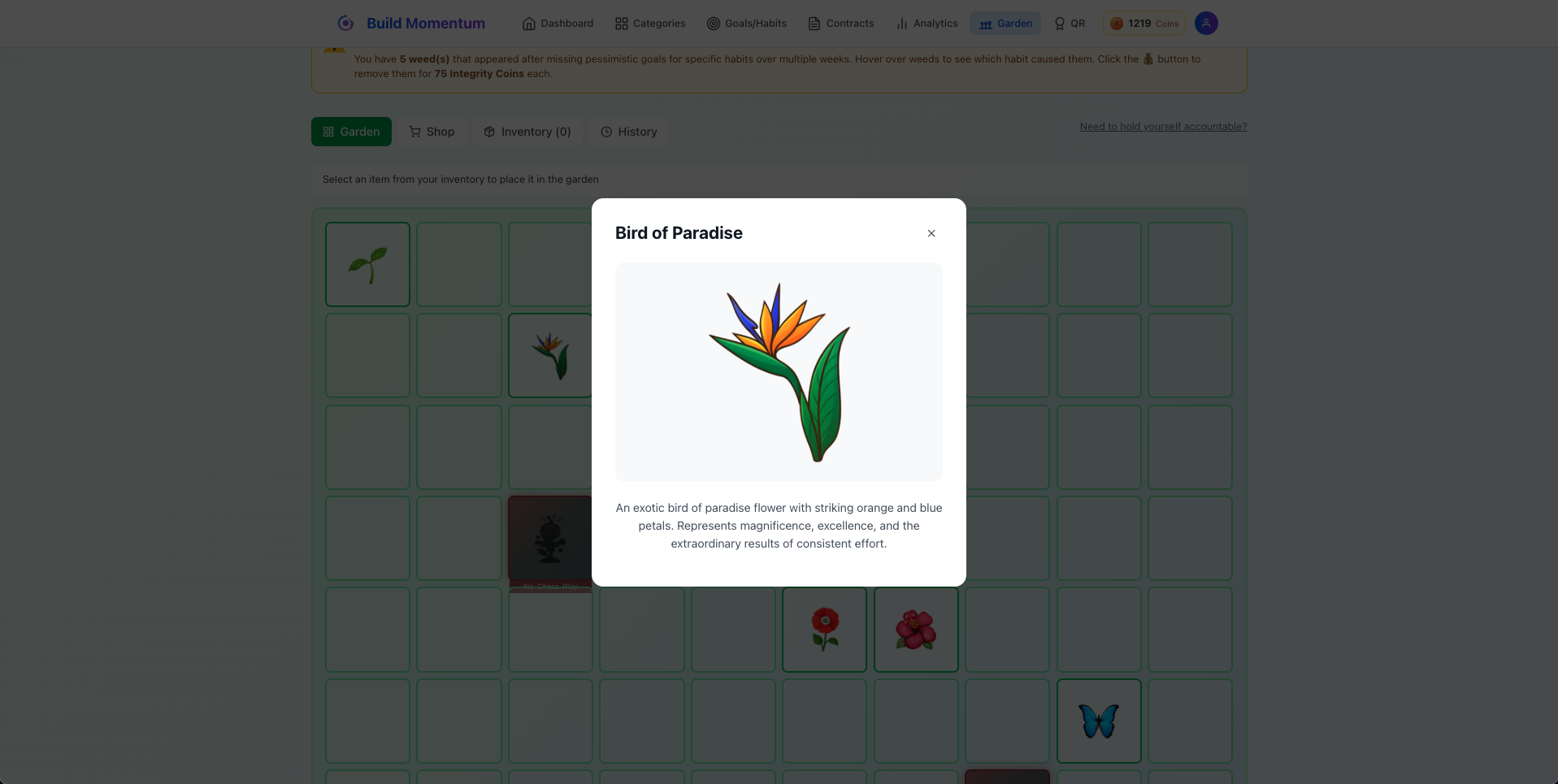
Build Momentum digital garden

🌺 Your progress, visible at a glance

Flowers and decorations when you show up; optional weeds when you want pressure. Earn Integrity Coins for targets, stretch hits, and reviews — spend them in the garden shop.

  • 200 starter coins & daily bonuses
  • Coins for weekly / quarterly reviews — not mindless streaks
  • Garden shop items unlock as you earn
  • No ads — rewards tied to your goals only
Garden Integrity Coins Shop Optional weeds

Why One System Beats Five Apps

Every extra app you use is a context switch, a separate login, and another place for things to fall through the cracks.

❌ The Old Way: Tool Sprawl

  • Habit app + task app + project app + notes app + contact management
  • Context switching increases friction and kills momentum
  • Re-entering the same data across tools
  • Fragmented planning — weekly reviews never happen
  • Each app has its own login, subscription, learning curve
  • Hard to see your full life in one place

✅ Build Momentum: One Connected System

  • Habits, tasks, projects, notes, and people in one login
  • One unified planning and review workflow
  • Shared context — everything knows about everything else
  • Weekly reviews actually happen because everything is in one place
  • One subscription, not five
  • See your entire execution system in one dashboard

Choose the Plan That Matches Your Workflow

Start free and scale as you grow. All plans include the full productivity suite.

Get Started
👤

Free

Start with core habits and goals, plus access to tasks, projects, notes, and budget with starter limits. No credit card required.

Up to 3 Goals/Habits
50 Tasks • 2 Projects
50 Notes • Budget Tracker
10 People
Garden & Weeds

No credit card required

Most Popular

Pro

More capacity, deeper workflows, stronger accountability features, expanded analytics, and full gamification access.

Up to 25 Goals/Habits
2,000 Tasks • 25 Projects
5,000 Notes • Budget Plus
Up to 100 People
7 Integrity Contracts

7-day free trial on yearly plan

Maximum Impact

Ultimate

Unlimited scale for power users with advanced insights and priority support.

Unlimited Goals/Habits
Unlimited Tasks • Projects
Unlimited Notes • Budget
Unlimited Integrity Contracts
Unlimited People

30-day money back guarantee

People Building Real Momentum

"I replaced four tools with Build Momentum. Weekly planning finally feels connected to daily execution."

— Alex, Product Manager

"The goals + habits system pulled me in, but tasks, notes, and budget are why I stayed. Everything I need is in one place."

— Mira, Freelancer

"The contract system is what got me. As a former Beeminder user, having legendary mentors hold me accountable pushed me harder than any streak counter ever did."

— Daniel, Founder

Frequently Asked Questions

Is Build Momentum only for habits?

No. Habits and goals are the core strength, but you also get a full GTD task system, project management with milestones, notes and KPI tracking, notes with notebooks and templates, people management,and a budget tracker with necessity levels — all in one account.

How is it different from Beeminder?

Beeminder charges real money when you fail ($5–$810+). In Build Momentum you create weekly contracts where you set your stakes: Same psychological accountability. You also get min/target/stretch goals, pausing, and 3 habit types — things Beeminder doesn't offer.

Can I start free and upgrade later?

Yes. The Free plan includes all core modules. Upgrade anytime as your workflow and goals grow. If you don't like certain modules you can disable them so they don't disturb your experience.

What is the necessity level system in the budget tracker?

Every expense gets rated 1–5: from Survival (bare bones) through Need It, Want (treat), Dumb Tax (avoidable), to Reckless (wasteful). Over time you see exactly where your money is really going and why.

Is it ADHD-friendly?

Yes. The interface is designed to be clean, color-coded, and fast. Quick data entry, no scattered information, and a calming layout that reduces overwhelm. It takes a few days to adjust, but the system becomes very natural once you get the hang of it.

Build Momentum Across Every Area of Life

Habits, tasks, projects, notes, and budgeting — one system, one login, one source of truth. Your garden reflects your integrity.

✓ Free to start  ·  ✓ Earn daily coins  ·  ✓ 20+ legendary mentors  ·  Goals/Habits Deep Dive →