
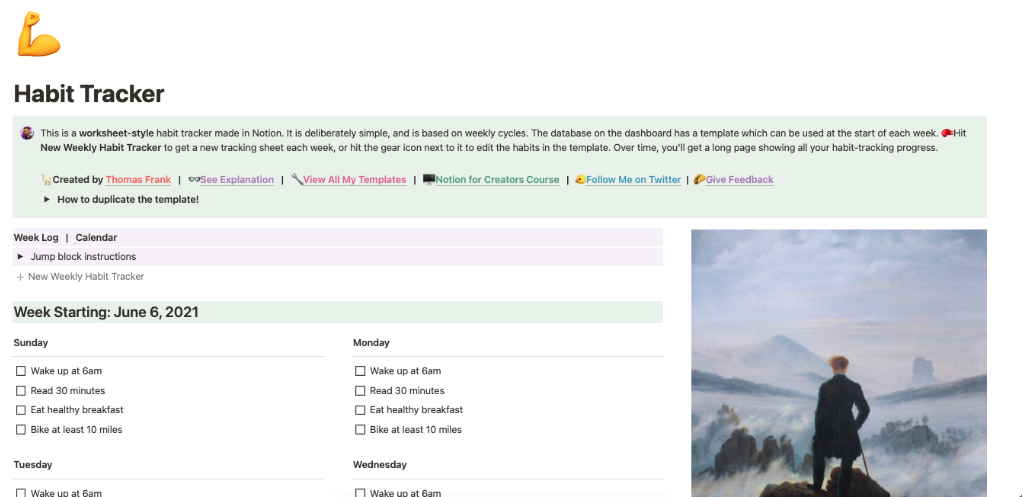
You’ve spent 5 hours this weekend building the “perfect” habit tracker in Notion.
Custom databases. Formula properties. Repeating templates. Multiple views (table, calendar, gallery, timeline). Progress bars with fancy formulas. Linked databases across your workspace. Color-coded everything.
It’s beautiful. It’s sophisticated. It’s exactly what you envisioned.
And then Monday comes. You forget to click the button to create today’s entry. Tuesday’s template doesn’t auto-generate like it should. Wednesday you spend 20 minutes troubleshooting why the formula broke. Thursday you’re too busy to maintain it.
By next Monday, you’ve stopped using it entirely.
Here’s the truth: You’re spending more time building and maintaining your habit tracking system than actually building habits.
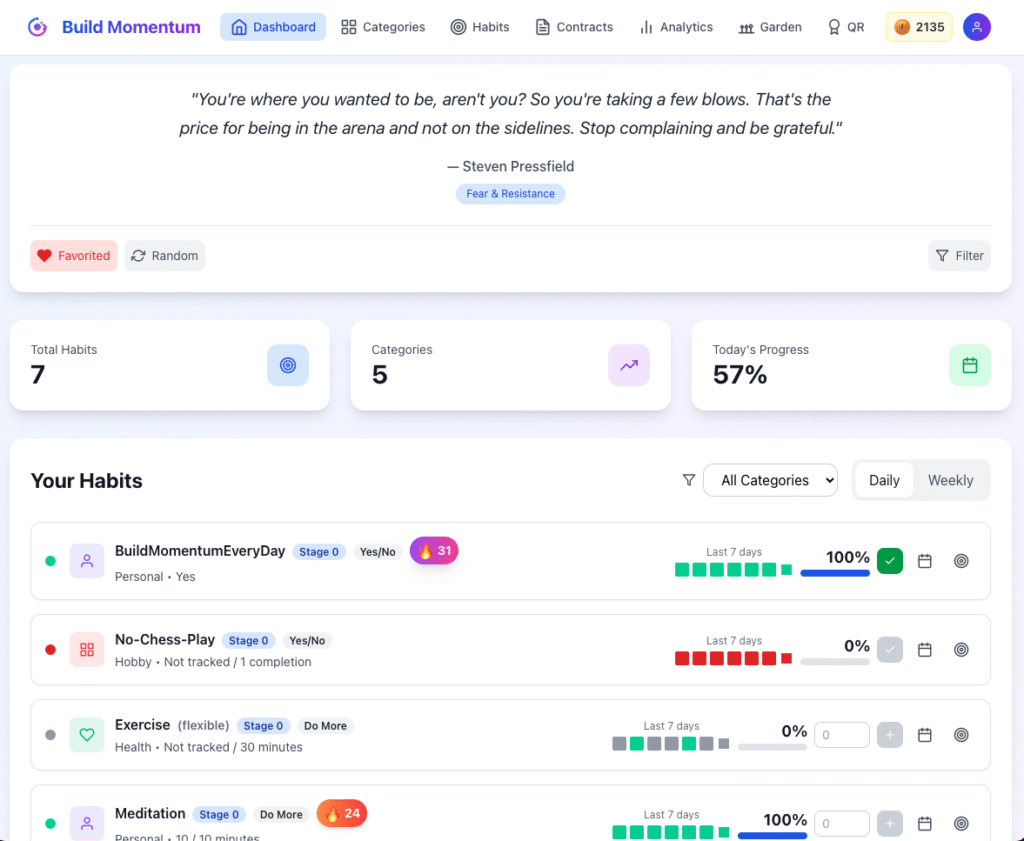
Meet Build Momentum—a purpose-built habit tracker for people who are tired of treating Notion like a full-time system administration job.
At-a-Glance: Notion vs Build Momentum
| Notion Habit Tracking | Build Momentum | |
|---|---|---|
| Setup time | 2-5 hours (building from scratch) | 5 minutes (ready to use) |
| Maintenance | Ongoing (templates break, formulas fail) | Zero (just track your habits) |
| Primary purpose | All-in-one workspace | Dedicated habit tracking |
| Learning curve | Steep (databases, formulas, views) | Gentle (intuitive from day one) |
| Visual motivation | DIY (if you build it) | Built-in beautiful garden |
| Progressive goals | Manual (recreate entire structure) | Built-in stages that increase |
| Performance tracking | Binary checkboxes | Three levels (minimum, target, stretch) |
| When templates break | Debug formulas and properties | Can’t break—it just works |
| Multi-timeframe view | Build it yourself with linked views | Built-in (daily, weekly, monthly, quarterly) |
| Gamification | DIY (if you spend hours building) | Built-in (garden, coins, contracts) |
| Mobile experience | Clunky, slow on phones | Responsive, fast, optimized |
| Focus | Build the perfect system | Build better habits |
| Cost | Free (but costs hours of your time) | $4-10/month (saves hours) |
What Notion Does (And Why It’s Not Enough for Habits)
Let’s be respectful: Notion is brilliant at what it does.
✅ All-in-one workspace – Notes, tasks, wikis, databases, everything
✅ Infinitely customizable – Build literally anything you can imagine
✅ Powerful databases – Link data across your entire workspace
✅ Collaborative – Share with teams, comment, co-edit
✅ Free tier – Generous free plan for personal use
Notion is perfect for:
- Project management
- Team wikis
- Note-taking systems
- Documentation
- Knowledge bases
But for habit tracking specifically? It’s overkill that becomes a liability.
The 7 Painful Truths About Notion Habit Tracking
1. You’re Building Instead of Doing
Based on tutorials and guides, setting up a proper Notion habit tracker involves:
- Creating a database with correct property types
- Setting up checkbox columns for each habit
- Building formula properties for progress calculations
- Creating repeating templates (with precise configuration)
- Setting up multiple views (table, calendar, gallery)
- Configuring filters and sorts
- Adding reminder notifications
- Testing to ensure templates auto-generate correctly
- Troubleshooting when they don’t
One guide describes this taking “a lot of tinkering and testing” just to get the visuals right.
Time spent building your system: 3-5 hours
Time spent doing your habits: Zero (you haven’t started yet)
2. Templates Break. Constantly.
Notion’s repeating templates are powerful but finicky:
- Sometimes they don’t auto-generate on schedule
- You have to remember to click the Button each day, and if you don’t, you won’t have a log for that day
- Database automations don’t trigger for pages created by repeating templates
- Formulas can break when Notion updates
- Properties sometimes don’t sync correctly
You wanted to track meditation. Instead, you’re debugging database automation rules.
3. Maintenance Is a Part-Time Job
Every few weeks you need to:
- Fix broken formulas when Notion updates
- Recreate templates that stopped working
- Adjust views that got misconfigured
- Update linked databases
- Clean up duplicate entries
- Troubleshoot why automation failed
This isn’t habit tracking. This is system administration.
4. It’s Overwhelming, Not Motivating
Overly complex layouts with too many sections or complicated navigation can detract from the main goal of tracking habits. Simplicity is key to maintaining focus and consistency.
You open Notion to check off “meditated today” and instead see:
- 4 different views you built (table, calendar, gallery, timeline)
- 12 different properties you configured
- Formula fields showing percentages
- Linked databases pulling from other pages
- Your entire workspace fighting for attention
You came to check a box. You left overwhelmed.
5. No Built-In Progression
Habits aren’t static. You start meditating 5 minutes daily and build to 30 minutes over months.
In Notion, tracking this progression means:
- Manually changing your entire database structure
- Rebuilding properties and formulas
- Or creating entirely separate trackers for each stage
There’s no built-in system for habits that grow with you.
6. Mobile Experience Is Painful
Notion on mobile is:
- Slow to load
- Clunky to navigate
- Difficult to check boxes quickly
- Not optimized for quick habit logging
You want to mark “went to gym” in 5 seconds while walking out of the gym.
Instead, you:
- Open Notion (15 seconds to load)
- Navigate to your habit tracker page
- Find today’s entry in the database
- Scroll to the right column
- Check the box
- Wait for it to sync
By the time you’ve done this, you could’ve done 10 pushups.
7. Customization Paralysis
Notion’s infinite flexibility is both its strength and weakness.
You can build anything… which means you spend hours:
- Trying different visual layouts
- Testing various formula approaches
- Reorganizing database properties
- Choosing color schemes
- Debating which view is “best”
Meanwhile, people using dedicated habit trackers are on Day 30 of consistent meditation.
Infinite options = infinite procrastination.
Real Stories from Notion Habit Trackers
Sarah: Lost 15 Hours to “Perfect” Setup
“I spent an entire weekend building my Notion habit tracker. Database, formulas, repeating templates, progress bars—the works. It was gorgeous.
Week 1: Worked perfectly. I felt so organized.
Week 2: The repeating template stopped auto-generating. Spent an hour fixing it.
Week 3: My formula broke after a Notion update. Spent another hour.
Week 4: Too busy to maintain it. Stopped using it entirely.
I’d spent 15 hours building and maintaining a system I used for less than a month. With Build Momentum, I set up in 5 minutes and I’ve been consistent for 3 months.”
Marcus: The Template Collection Trap
“I have 23 different Notion habit tracker templates saved. I’ve tried them all.
Some were too simple. Some were too complex. Some broke immediately. Some worked for a week then stopped working as expected.
I finally realized: I was collecting and testing templates instead of building habits. I was optimizing the system instead of using it.
Build Momentum has one setup. It works. I stopped tinkering and started doing.”
Priya: Notion for Work, Build Momentum for Habits
“I love Notion for project management. It’s perfect for my work.
But for habits? I need something I can check in 30 seconds without thinking. Notion requires me to navigate my entire workspace, find the right page, remember which view I prefer, and check a box in a database.
Now I use Notion for work. Build Momentum for habits. Each tool does what it’s best at.”
How Build Momentum Is Different
1. Built for Habits, Not Everything
Notion: Swiss Army knife (does everything okay)
Build Momentum: Surgical scalpel (does one thing perfectly)
Build Momentum was designed from the ground up for progressive habit formation. Every feature serves that single purpose.
No databases to configure. No templates to build. No formulas to debug.
Just: What habit? What’s your goal? Start tracking.
2. Progressive Stages (Built-In)
Notion: Static checkboxes forever
Build Momentum: Habits that grow with you
Example: Meditation Habit
Stage 1 (First Month):
- Daily: Minimum 5 min | Target 10 min | Stretch 15 min
- Weekly: Minimum 30 min | Target 60 min | Stretch 90 min
- Monthly: Minimum 150 min | Target 300 min | Stretch 450 min
Stage 2 (Months 2-3):
- Daily: Minimum 10 min | Target 15 min | Stretch 20 min
- Weekly: Minimum 60 min | Target 90 min | Stretch 120 min
Stage 3 (Months 4+):
- Daily: Minimum 15 min | Target 20 min | Stretch 30 min
In Notion, you’d need to:
- Rebuild your entire database structure
- Update all formulas
- Recreate templates
- Migrate data
In Build Momentum: Click “Next Stage.” Done.
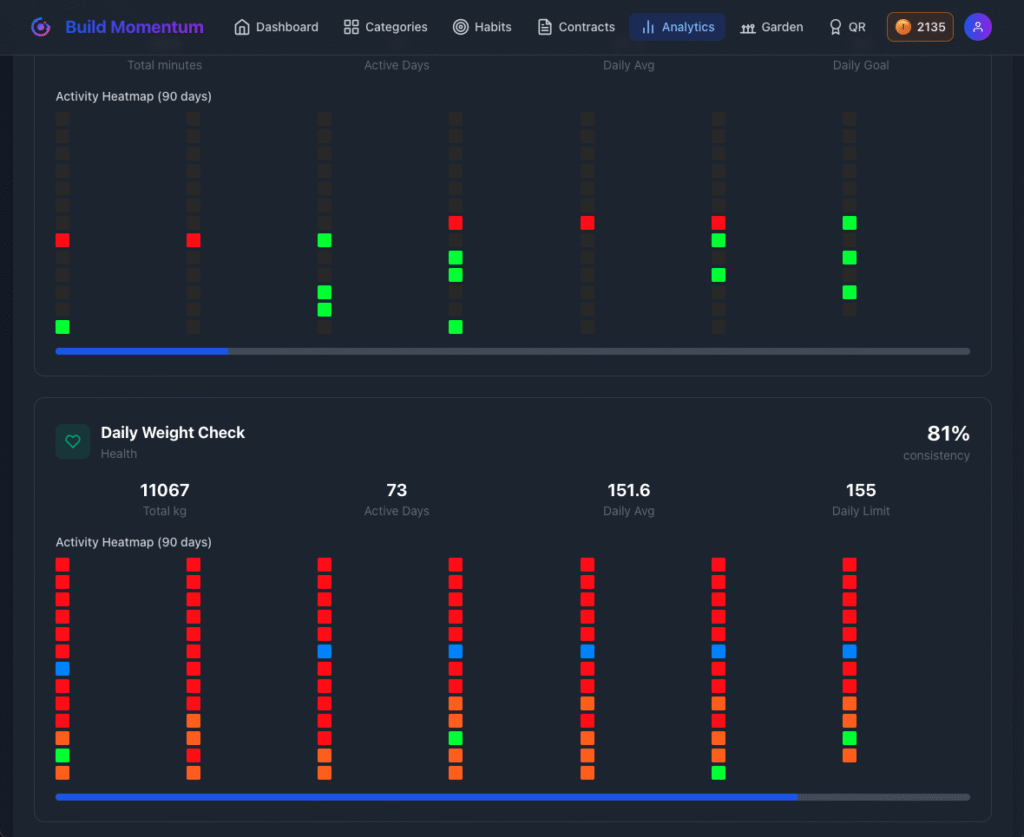
3. Three Performance Levels (Not Just Checkboxes)
Notion: ☑️ Did it or didn’t
Build Momentum: How well did you do?
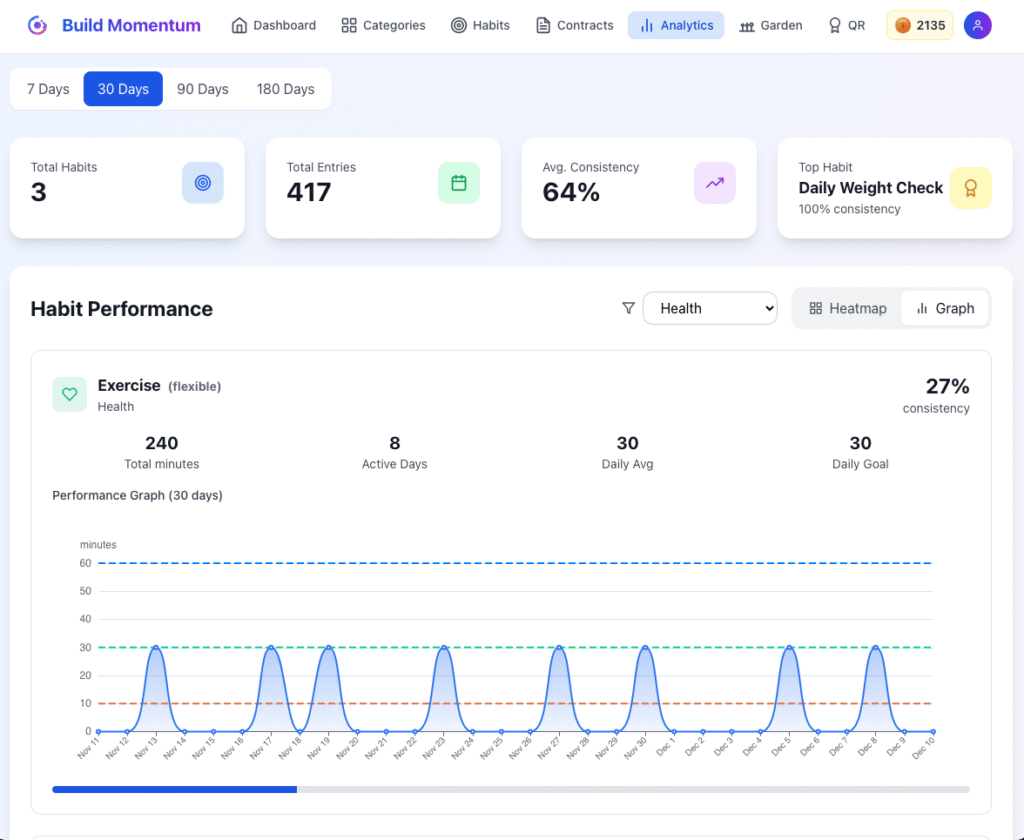
🟠 Minimum Goal (Orange): Bare minimum—fall below weekly and weeds grow
🟢 Target Goal (Green): Your main goal—what you’re shooting for
🔵 Stretch Goal (Blue): Your best-case—bonus achievement
This isn’t just “did I meditate today?” It’s “did I hit 5 minutes (minimum), 10 minutes (target), or 15 minutes (stretch)?”
You’re tracking quality and improvement, not just completion.
4. Four Time Perspectives (Not Just Daily)
Notion: Build separate views yourself with complex filters
Build Momentum: Built-in and automatic
- Daily: How am I doing today?
- Weekly: Am I on track this week?
- Monthly: What’s my overall trend?
- Quarterly: Big picture progress
One bad day doesn’t ruin your week. One bad week doesn’t destroy your quarter.
Notion CAN do this… if you spend hours building linked database views with proper filters and formulas.
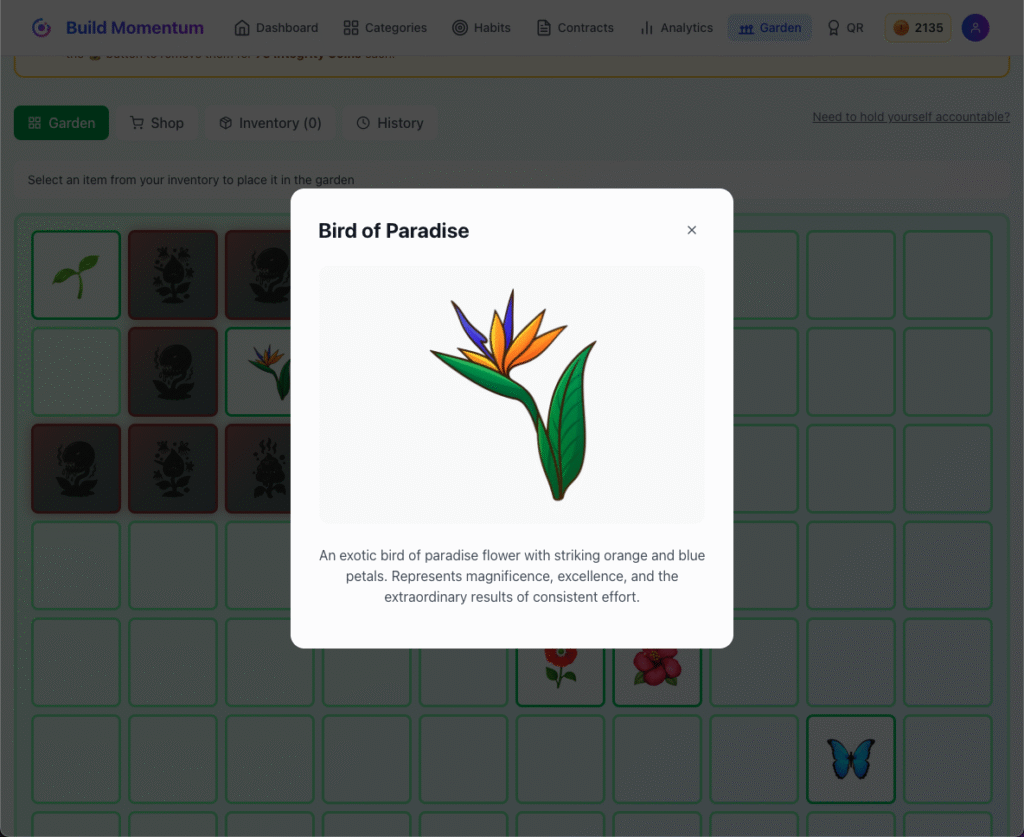
5. Visual Garden (Not DIY Charts)
Notion: Build your own visualizations (if you know how)
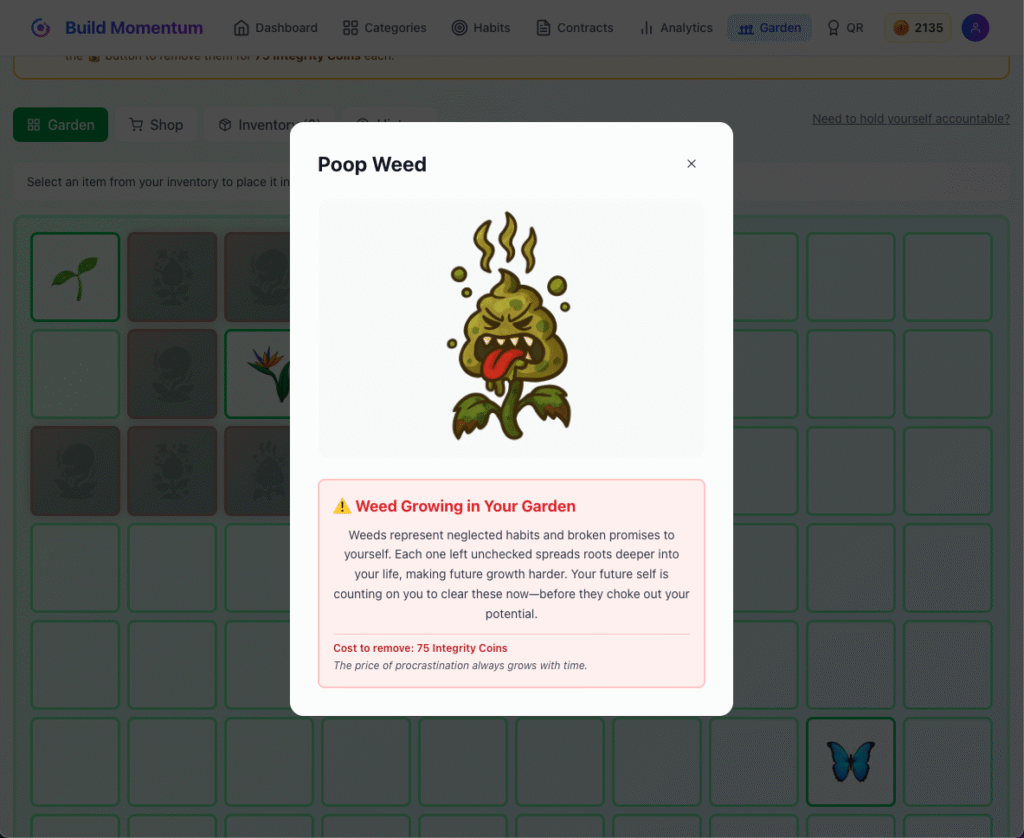
Build Momentum: Beautiful virtual garden built-in
How it works:
- Track consistently → Garden blooms with flowers, plants and animals
- Miss weekly minimum → Weeds appear
- Multiple misses → Garden gets overgrown
- Each year → New garden (visual timeline of your journey)
No building required. No formulas to write. No charts to configure.
Just a living, breathing visualization of your discipline.
6. Gamification (Ready to Use)
Notion: Spend hours building point systems and rewards
Build Momentum: Built-in coin economy and contracts
Earn coins by tracking consistently:
- Remove weeds when you slip up
- Buy garden decorations
- Create contracts where you bet coins on goals
Optional contracts for extra motivation:
- Choose a legendary mentor
- Bet coins on hitting a goal
- Win: 1.3x coins back
- Fall short: Coins returned based on how close you got
In Notion, you’d need to build this entire system from scratch with complex formulas.
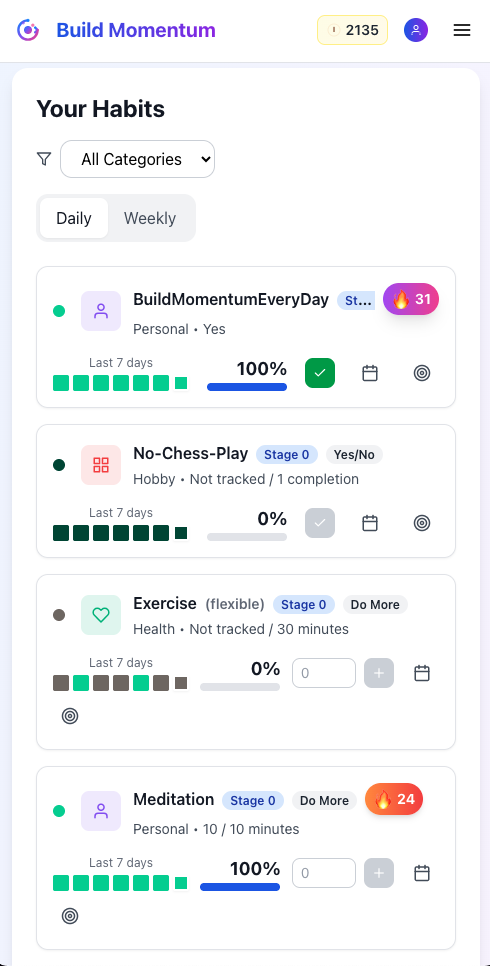
7. Mobile-First Design
Notion: Desktop tool that works (poorly) on mobile
Build Momentum: Mobile-first, works everywhere
Check your habits in 30 seconds:
- Open app/site (instant load)
- See today’s habits
- Mark complete
- Done
No navigating workspace hierarchies. No waiting for database loads. No fighting with mobile UI.
8. Zero Maintenance
Notion: Ongoing system administration
Build Momentum: It just works
You’ll never:
- Debug broken templates
- Fix formula errors
- Recreate auto-generation rules
- Troubleshoot sync issues
- Update database structures
Set it up once. Use it forever. No maintenance required.
The Time Calculation
Notion Habit Tracking (First Month):
- Initial setup: 3-5 hours
- Learning databases, formulas, views: 2 hours
- First template break: 1 hour to fix
- Second template break: 1 hour to fix
- Formula debugging after Notion update: 1 hour
- Reorganizing because it’s not working: 2 hours
Total time investment: 10-13 hours
Time spent actually building habits: Whatever’s left
Build Momentum (First Month):
- Initial setup: 5 minutes
- Maintenance: 0 minutes
- Debug time: 0 minutes
Total time investment: 5 minutes
Time spent actually building habits: Everything else
When Notion Makes Sense vs When Build Momentum Wins
Use Notion for habit tracking if:
✅ You genuinely enjoy building systems (it’s the hobby, not the habits)
✅ You want habits integrated into your all-in-one workspace
✅ You need heavy customization tied to other Notion databases
✅ You have time to maintain and debug templates
✅ Simple checkboxes are sufficient (no growth tracking needed)
✅ Mobile tracking isn’t important to you
✅ You’re okay troubleshooting when things break
✅ Building the tracker is part of your productivity hobby
Use Build Momentum if:
✅ You want to track habits, not build systems
✅ You need something that works in 5 minutes, not 5 hours
✅ Progressive stages appeal to you (habits that grow)
✅ You want three performance levels (minimum, target, stretch)
✅ You want more habit types (do more, do less, yes/no)
✅ You don’t want ongoing maintenance and debugging
✅ Visual gamification motivates you (garden, coins, contracts)
✅ You want multi-timeframe perspective (daily, weekly, monthly, quarterly)
✅ Zero tolerance for broken templates and formula errors
✅ You value your time more than customization
The Honest Comparison
Philosophy
Notion: “Build anything you can imagine”
Build Momentum: “Just track your habits”
Notion: Infinite flexibility
Build Momentum: Focused simplicity
Best For
Notion: People who love building systems
Build Momentum: People who love building habits
Notion: Those with time to tinker
Build Momentum: Those with habits to build
Time Investment
Notion: High upfront, ongoing maintenance
Build Momentum: 5 minutes, zero maintenance
Risk
Notion: Templates break, formulas fail, updates disrupt
Build Momentum: It just works
Mobile
Notion: Functional but slow
Build Momentum: Fast and optimized
Common Questions
Can I import my Notion habit data?
Not automatically. You’ll recreate your habits in Build Momentum (5 minutes per habit). The benefit? You’ll set up progressive stages that actually match how habits form.
What if I already have my entire life in Notion?
Keep it there! Use Notion for projects, notes, wikis, and documentation. Use Build Momentum for habits.
Many users do this: Notion for everything else, Build Momentum for habit tracking.
Each tool does what it’s best at.
Isn’t Notion free while Build Momentum costs money?
Notion is free with your time. Build Momentum costs money but saves time.
Would you rather:
- Spend 10-15 hours building/maintaining a Notion tracker (free)
- Spend 5 minutes setting up Build Momentum ($10-15/month)
Your time is worth something. How much is 10 hours worth to you?
What if I love building Notion systems?
Then keep using Notion! Seriously.
If building the perfect habit tracking system is your hobby, Notion is perfect for that.
But if you want to actually build habits (not systems), Build Momentum is purpose-built for you.
Can Build Momentum integrate with Notion?
Not currently. They’re separate tools serving different purposes.
Think of it like: you wouldn’t expect your project management tool to also be your email client. Different jobs, different tools.
What about Notion’s templates I can download?
Templates are great for getting started, but:
- Some templates are complex, so if you’re struggling to understand a feature, feel free to delete it from the template
- They often break after Notion updates
- You still need to understand databases and formulas to customize them
- Maintenance is still required
Templates save setup time but don’t eliminate the core issues.
The Bottom Line
Notion is an incredible all-in-one workspace. For project management, documentation, and knowledge bases, it’s genuinely brilliant.
But for habit tracking? You’re using a sledgehammer to hang a picture frame.
Build Momentum is a purpose-built tool that does one thing perfectly: helps you build progressive, sustainable habits without becoming a system administrator.
The question is simple: Do you want to build systems for hours, or do you want to build habits with an already working system?
Try Build Momentum Free for 7 Days
See what happens when you stop maintaining your habit tracking system and start maintaining your habits.
- ✅ No credit card required to start
- ✅ Set up in 5 minutes (not 5 hours)
- ✅ Progressive stages built-in
- ✅ Beautiful garden visualization
- ✅ Zero maintenance, zero debugging
- ✅ Works on any device
For Notion Power Users
We respect that many of you are Notion experts who’ve built incredible systems.
Our offer: Try Build Momentum for habits while keeping Notion for everything else.
See if having a dedicated, purpose-built habit tracker lets you:
- Spend less time on system maintenance
- Track habits more consistently
- Actually see progressive improvement
If Notion habit tracking works better for you, that’s genuinely fine. We’re not here to convert everyone—just the people who are tired of debugging templates when they should be building habits.
What Users Are Saying
“I spent an entire Saturday building my Notion habit tracker. It broke the next week. Build Momentum has worked flawlessly for 3 months.” — Jessica K.
“I love Notion for project management. But for habits, I needed something that just works without thinking. Build Momentum is that.” — David M.
“I had 15 different Notion habit tracker templates saved. I kept trying to find the ‘perfect’ one. Now I realize I was optimizing templates instead of building habits.” — Sarah T.
“Notion is for building. Build Momentum is for doing. I use both, for different purposes.” — Marcus R.
Ready to Stop Building and Start Doing?
If you’re tired of spending more time maintaining your habit tracking system than actually tracking habits, it’s time to try something purpose-built.
Start your free 7-day trial of Build Momentum.
Stop debugging formulas. Stop fixing broken templates. Stop spending weekends building “perfect” systems.
Start building habits instead.
Get Started Free (No Credit Card Required) →
← Previous Post
Beyond Streaks: Track Progress, Not Just Consistency